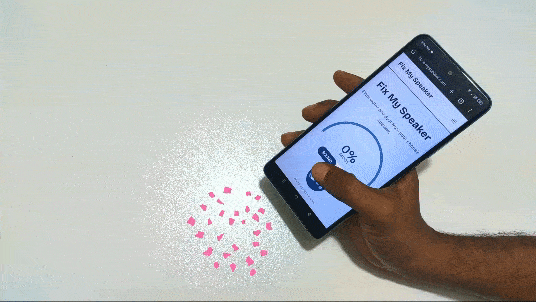
Clear audio is an important part of using any smartphone. Whether you are listening to music, watching videos, attending an online class, making a phone call, or using speakerphone, a clean and properly working speaker can make a huge difference. Over time, however, dust, dirt, lint, and other small particles can collect around the speaker openings and affect sound quality.
FixMySpeakers is designed to help users understand common speaker problems and explore practical ways to improve speaker performance. From basic speaker cleaning to troubleshooting muffled audio, learning how to care for your device can help maintain better sound quality.
What Is FixMySpeakers?
FixMySpeakers is a useful resource for people who want to learn more about smartphone speaker cleaning, maintenance, and troubleshooting. Phone speakers are exposed to everyday environments, meaning they can easily collect dust and debris.
Instead of immediately assuming that a speaker is damaged, users can first check whether the problem is caused by something simple, such as blocked speaker openings, incorrect volume settings, software issues, or moisture.
Understanding the possible causes can help users take appropriate steps before seeking professional repair.
Why Do Phone Speakers Become Muffled?
There are several reasons why a phone speaker may suddenly sound quieter or less clear.
One of the most common causes is dust buildup. Small particles can settle inside or around speaker openings and reduce the amount of sound that comes through.
Another common issue is lint. If you regularly keep your phone in a pocket or bag, fabric fibers can accumulate around the speaker grille.
Moisture can also affect audio performance. After exposure to water or high humidity, a phone speaker may temporarily sound distorted or muffled.
Software problems may be another possibility. An incorrectly configured audio setting, connected Bluetooth device, or temporary system issue can sometimes make users think the physical speaker is broken.
Common Signs of a Speaker Problem
Knowing the symptoms can make troubleshooting easier. Some common signs include:
- Low speaker volume
- Muffled or unclear audio
- Distorted sound
- Crackling during calls or media playback
- Audio that cuts in and out
- One speaker appearing quieter than expected
- Reduced sound after exposure to dust or moisture
If these problems appear suddenly, checking simple causes first can be helpful.
How to Clean a Phone Speaker Safely
Cleaning the outside of a phone speaker should be done carefully. Speaker grilles contain small openings, and aggressive cleaning can potentially push debris deeper into the device.
Start by turning the device off if appropriate and inspecting the speaker openings under good lighting. A soft, dry brush can be useful for gently removing loose surface debris.
Avoid pushing sharp objects into the speaker holes. Items such as pins, needles, or metal tools can damage delicate components or the protective mesh.
It is also important to avoid pouring liquids directly onto the speaker area. Even when a phone has some level of water resistance, unnecessary liquid exposure can create problems.
Can Dust Affect Speaker Quality?
Yes. Dust and debris can affect the way sound travels through a speaker grille. When enough material accumulates, the openings may become partially blocked.
This can make the speaker appear to have lower volume even though the internal hardware is still functioning.
Regularly keeping the exterior of your smartphone clean can reduce the amount of debris that builds up over time. However, cleaning should always be gentle and appropriate for the specific device.
What About Water in the Speaker?
Water exposure can temporarily affect speaker performance. If a phone has been exposed to water, avoid immediately applying heat or inserting objects into the speaker openings.
Allowing the device to dry according to the manufacturer’s recommendations is generally safer than attempting aggressive DIY methods.
If audio remains distorted after the device has had sufficient time to dry, professional inspection may be appropriate.
Check Your Phone’s Audio Settings
Not every speaker problem is caused by dirt or physical damage. Before assuming the speaker needs repair, check the phone’s volume and sound settings.
Make sure media volume is turned up and check whether the device is connected to Bluetooth headphones, speakers, or another audio accessory.
Restarting the phone can also resolve temporary software-related audio problems.
If the issue occurs only in one application, test another application. For example, if music sounds normal but a particular video app has no sound, the problem may be related to that application rather than the phone’s speaker.
Why Speaker Maintenance Matters
Smartphones are used every day and are often exposed to dust, pockets, bags, desks, outdoor environments, and other sources of debris. Basic maintenance can help keep external components in better condition.
Speaker maintenance is particularly useful because users may not notice gradual changes in audio quality. A speaker can slowly become quieter as debris accumulates.
Keeping the device clean and avoiding unnecessary exposure to moisture can support better long-term usability.
When Should You Consider Professional Repair?
If basic troubleshooting does not solve the problem, the speaker may have a hardware issue.
Professional assistance may be worth considering if:
- The speaker remains distorted after cleaning.
- Audio completely stops working.
- The device has suffered physical damage.
- The phone was exposed to significant moisture.
- Sound problems continue after restarting and checking settings.
- The issue affects multiple audio functions.
Attempting to open a smartphone without the proper knowledge or tools can cause additional damage. For serious hardware problems, contacting the device manufacturer or a qualified repair professional is usually the safer choice.
How FixMySpeakers Can Help
FixMySpeakers can serve as a helpful starting point for users dealing with common smartphone speaker issues. Instead of immediately assuming that a speaker is permanently damaged, users can learn about possible causes and basic troubleshooting steps.
Whether the issue involves dust, muffled audio, moisture, settings, or general maintenance, understanding the problem is the first step toward finding an appropriate solution.
For users who frequently rely on their phones for calls, entertainment, education, or communication, maintaining clear audio is especially important.
Final Thoughts
A smartphone speaker can experience reduced performance for many different reasons. Dust, lint, moisture, software settings, and hardware damage can all contribute to poor audio quality.
With FixMySpeakers, users can learn more about speaker maintenance and troubleshooting while understanding when a simple cleaning or settings check may be enough and when professional assistance may be necessary.
The most important approach is to handle your device carefully. Avoid sharp tools, excessive moisture, and aggressive cleaning methods. Regular inspection and gentle maintenance can help keep your phone’s speaker working properly and delivering clearer audio for everyday use.