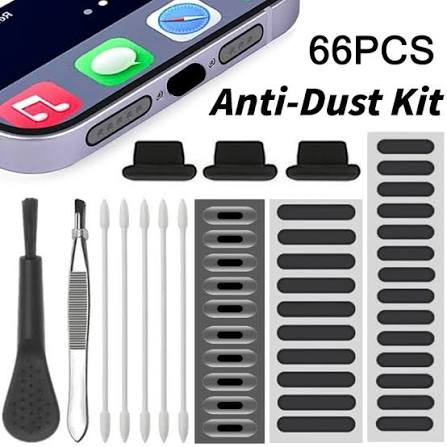
Dust can slowly collect around your iPhone speakers, charging port, microphone, and other small openings. Over time, this buildup may affect sound quality, charging performance, and the overall cleanliness of your device. Using an iPhone dust cleaner correctly can help remove unwanted dirt and keep your iPhone working properly.
Many users notice that their iPhone speaker becomes quieter, phone calls sound muffled, or the charging cable does not connect as smoothly as before. In some cases, dust and pocket lint may be responsible. Before assuming that your iPhone has a hardware problem, it is worth checking whether its openings simply need gentle cleaning.
This guide explains how an iPhone dust cleaner works, how to clean different parts of your iPhone safely, and which cleaning methods you should avoid.
What Is an iPhone Dust Cleaner?
An iPhone dust cleaner can refer to a tool, cleaning method, soft brush, or sound-based solution designed to remove dust and small particles from different areas of an iPhone.
Dust commonly collects around:
- Bottom speakers
- Earpiece speaker
- Charging port
- Microphone holes
- Camera edges
- Buttons
- Phone case openings
Because these areas contain very small gaps, pocket lint and dirt can gradually become trapped inside them.
Regular cleaning may help prevent excessive buildup and maintain better device performance.
Why Does Dust Build Up Inside an iPhone?
Your iPhone is exposed to dust every day.
Phones are commonly carried inside pockets, handbags, backpacks, cars, and other environments where tiny fibers and dirt particles are present. These particles can enter small openings around the device.
Pocket lint is particularly common around the charging port because the port is exposed whenever the phone is stored inside clothing.
Other sources of buildup include:
- Household dust
- Fabric fibers
- Skin oils
- Makeup
- Dirt from hands
- Outdoor particles
- Debris trapped inside phone cases
Using an iPhone dust cleaner periodically can help reduce this accumulation.
How to Clean Dust From an iPhone Speaker
The speaker is one of the most common areas where dirt builds up.
If your iPhone speaker sounds quieter than usual, inspect the speaker grill under good lighting.
Start by removing your phone case. Dust sometimes becomes trapped between the case and speaker openings.
Use a clean, dry, soft-bristled brush to gently brush across the speaker grill.
Avoid pushing the brush deeply into the speaker holes.
Hold the iPhone so the speaker faces downward while brushing. This may allow loosened particles to fall away instead of moving further inside.
After cleaning, test your speaker by playing music or making a phone call.
Can an iPhone Dust Cleaner Improve Speaker Sound?
An iPhone dust cleaner may improve speaker sound when dust or debris is partially blocking the speaker openings.
A blocked speaker may produce:
- Low volume
- Muffled sound
- Distorted audio
- Reduced bass
- Unclear phone calls
- Uneven speaker output
Removing surface debris allows sound to travel through the speaker grill more freely.
However, cleaning cannot repair damaged internal speaker components. If sound remains distorted after cleaning, your iPhone may need professional inspection.
Using Sound to Clean an iPhone Speaker
Some users also use sound-based speaker-cleaning tools.
A sound-based iPhone dust cleaner plays certain frequencies that cause the speaker membrane to vibrate. These vibrations may help move loose particles or small amounts of moisture away from the speaker.
To use this method, place your iPhone on a clean surface and make sure the speaker is uncovered.
Play the speaker-cleaning sound at a reasonable volume.
You can position the speaker downward so any loosened particles or moisture have a better chance of moving outward.
Sound cleaning may be helpful for loose debris, but it should not replace physical cleaning when visible dust is covering the speaker grill.
How to Clean Dust From the iPhone Charging Port
The charging port is another area where lint can collect.
A heavily blocked charging port may make it difficult for the charging cable to connect properly.
Possible signs of a dirty charging port include:
- Cable feels loose
- Charging stops unexpectedly
- Cable does not insert completely
- Phone charges only at certain angles
- Connection feels inconsistent
Before cleaning the port, turn off your iPhone and disconnect all cables.
Inspect the port carefully under bright lighting.
Avoid inserting metal objects into the charging port. The internal contacts can be damaged easily.
If debris is deeply packed inside the port and cannot be removed safely, professional cleaning is the better option.
Cleaning the iPhone Earpiece Speaker
The earpiece speaker is located near the top of the iPhone and is used during normal phone calls.
Dust, makeup, and skin oils can gradually cover this area.
When that happens, voices during calls may sound quiet or muffled.
A soft, dry brush can be used as an iPhone dust cleaner for the earpiece area.
Gently brush across the opening without applying strong pressure.
After cleaning, make a test call and adjust the call volume to check whether the sound has improved.
Cleaning Dust Around the iPhone Camera
Dust can also collect around the edges of your camera lenses.
Although this usually does not enter the internal camera system, surface dirt can affect photo clarity if it covers the lens.
Use a clean microfiber cloth to gently wipe the camera lenses.
Avoid using rough fabrics that could scratch the glass.
If you notice dust appearing underneath the camera lens rather than on its surface, do not attempt to open the phone yourself. Internal cleaning should be handled by a trained technician.
What Should You Avoid When Cleaning Your iPhone?
Using the wrong cleaning method can cause permanent damage.
When using an iPhone dust cleaner, avoid sharp or aggressive tools.
Do not use:
- Needles
- Pins
- Metal wires
- Paper clips
- Sharp blades
- Excessive compressed air
- Wet brushes
- Cleaning liquids poured into openings
Sharp objects can damage the speaker mesh, microphone, or charging contacts.
Strong compressed air may also push dust deeper into your iPhone rather than removing it.
Gentle cleaning is much safer.
Should You Use Water to Clean iPhone Dust?
Water should not be applied directly to your iPhone’s ports or speaker openings.
Even if your iPhone has water resistance, deliberately introducing moisture into openings is unnecessary and can create problems.
For everyday dust cleaning, dry methods are generally preferable.
A soft brush and microfiber cloth are usually enough for surface cleaning.
How Often Should You Clean Your iPhone?
There is no exact schedule for cleaning your device.
For normal users, inspecting the speaker and charging port every few weeks can help identify buildup before it becomes severe.
You may need to clean your iPhone more frequently if you:
- Work in dusty environments
- Carry your phone inside pockets frequently
- Work around construction materials
- Spend a lot of time outdoors
- Use your phone in workshops
- Keep your phone inside fabric bags
Regular light cleaning is usually easier than removing heavily packed lint later.
How to Prevent Dust From Entering Your iPhone
Prevention can reduce the amount of cleaning your phone needs.
Keep your phone case clean because dust can accumulate between the case and device.
Avoid placing your iPhone directly on dirty or dusty surfaces.
Clean pockets and bags where you regularly store your phone.
You can also inspect the charging port occasionally and remove visible surface dirt before it becomes compressed.
These simple habits can reduce the need for frequent iPhone dust cleaner use.
Benefits of Keeping Your iPhone Dust-Free
Keeping your device clean can improve both appearance and usability.
Possible benefits include:
- Clearer speaker sound
- Better phone call quality
- Cleaner charging port
- More reliable charging connection
- Reduced debris around microphones
- Cleaner camera lenses
- Better overall device maintenance
Regular cleaning may also help you identify genuine hardware problems more easily.
If cleaning removes the problem, you know the issue was likely caused by debris rather than internal damage.
When Should You Get Professional Cleaning?
Home cleaning is suitable for light surface dust, but some situations require professional help.
Consider having your iPhone inspected if:
- The charging cable will not connect
- Speaker volume remains extremely low
- Audio continues to crackle
- Dust appears underneath the camera lens
- The microphone stops working
- Debris is deeply packed inside a port
- Your phone has experienced significant water exposure
A trained technician has appropriate tools for cleaning delicate internal components.
FAQs About iPhone Dust Cleaner
Does an iPhone dust cleaner really work?
Yes, an iPhone dust cleaner can help when speaker grills, ports, or other openings contain loose dust and debris. It cannot repair physically damaged components.
How do I remove dust from my iPhone speaker?
Use a clean, dry, soft-bristled brush and gently brush across the speaker grill. Avoid pushing objects deeply into the speaker holes.
Can dust make an iPhone speaker quieter?
Yes. Dust, lint, and other particles can block speaker openings and reduce sound clarity or volume.
Can I use a toothbrush to clean my iPhone?
A clean and very soft dry brush may be suitable for gentle surface cleaning. Avoid hard bristles and excessive pressure.
Can I use compressed air on my iPhone?
Strong compressed air is generally best avoided around delicate openings because it may push debris deeper inside or damage components.
Why is my iPhone charging port not working after cleaning?
If charging problems continue, there may still be compacted debris or a hardware issue. Professional inspection is recommended rather than inserting sharp tools into the port.
Conclusion
Dust buildup is a common issue for smartphones because they are exposed to pockets, bags, surfaces, and outdoor environments every day. Speakers, charging ports, microphones, and other small openings can gradually collect dirt and lint.
Using an iPhone dust cleaner safely can help remove surface debris, improve speaker clarity, maintain a cleaner charging connection, and keep your device in better condition.
Always use gentle, dry cleaning methods and avoid sharp tools, excessive pressure, or liquids near your iPhone openings. If cleaning does not solve the problem, professional inspection can help determine whether there is an internal hardware issue.
Regular maintenance is one of the simplest ways to keep your iPhone clean, functional, and ready for everyday use.