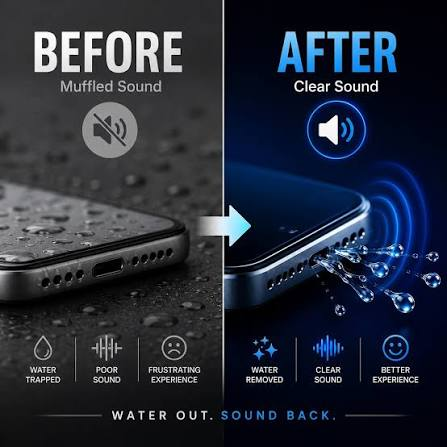
If your phone was recently exposed to water and the audio suddenly sounds unclear, low, or distorted, you are probably dealing with water in phone speaker muffled sound. This problem is common after dropping a phone in water, using it in heavy rain, spilling a drink near it, or taking it into a humid environment.
A muffled phone speaker does not always mean the speaker is permanently damaged. In many cases, tiny water droplets become trapped inside the speaker grille or around the speaker membrane. These droplets interfere with normal speaker vibrations, making music, calls, videos, and notifications sound quieter or less clear than usual.
Fortunately, there are several safe ways to deal with water in phone speaker muffled audio. Below, we explain why it happens, how you can remove trapped water, what methods you should avoid, and when your phone may need professional repair.
Why Does Water Make a Phone Speaker Sound Muffled?
Your phone speaker creates sound through a small membrane that vibrates rapidly. When water gets inside or around the speaker opening, these vibrations can become restricted.
Instead of producing clear audio, the speaker may sound:
- Muffled
- Quiet
- Distorted
- Crackling
- Buzzing
- Unclear during calls
- Weak when playing music
- Like the sound is coming from underwater
If you have water in phone speaker muffled sound immediately after your phone becomes wet, trapped moisture is often the main cause.
The speaker may return to normal after the moisture is removed or completely dries.
What to Do When Water Gets Into Your Phone Speaker
Reacting correctly after water exposure can help prevent further problems.
Remove the Phone From Water Immediately
If your phone was dropped into water, remove it as quickly as possible. Longer exposure can allow moisture to move deeper into the phone.
Remove the Phone Case
A phone case may trap moisture around the speaker, microphone, buttons, and charging port. Take the case off and gently wipe the phone with a clean, soft cloth.
Keep the Speaker Facing Down
Hold or position your phone so that the speaker openings face downward. Gravity may help some trapped droplets move toward the speaker grille.
Avoid violently shaking the device because this could move water deeper into other internal areas.
How to Remove Water From a Muffled Phone Speaker
If trapped moisture is causing water in phone speaker muffled audio, a few simple methods may help restore normal sound.
Use a Speaker Water Ejection Sound
One of the most convenient solutions is using a speaker cleaning or water-ejection sound.
A water-ejection tool plays specific sound frequencies through your phone speaker. These frequencies make the speaker membrane vibrate repeatedly. The vibration may help push trapped water droplets toward and out of the speaker grille.
For better results:
- Remove the phone case.
- Place the phone with the speaker facing downward.
- Increase the speaker volume to a suitable level.
- Play the water-ejection sound.
- Check the speaker grille for moisture.
- Repeat the process if necessary.
You may notice small droplets appearing around the speaker opening during the process.
Let the Phone Dry Naturally
Natural drying can also help solve water in phone speaker muffled problems.
Place your phone somewhere dry with good airflow. Keep it at normal room temperature and allow enough time for moisture to evaporate.
Do not cover the speaker openings while the phone is drying.
If possible, keep the speaker facing downward so moisture has an easier path out of the device.
Do Not Use Excessive Heat
A common mistake is trying to dry a wet phone using a hair dryer or another strong heat source.
This can cause more harm than good.
Excessive heat may:
- Damage the phone battery
- Weaken internal adhesives
- Affect the display
- Damage waterproof seals
- Push moisture farther inside
- Harm sensitive electronic components
If you are trying to fix water in phone speaker muffled audio, room-temperature airflow is usually a safer choice.
Should You Put Your Phone in Rice?
Rice is one of the most popular traditional suggestions for wet phones, but it is not an ideal solution for speaker moisture.
Rice cannot directly pull water droplets from inside a speaker grille. Small particles or dust from rice may also enter your phone’s charging port or speaker holes.
Instead of relying on rice, allowing natural airflow and using a speaker water-removal sound may be more useful for moisture trapped around the speaker.
Why Is My Phone Speaker Still Muffled After Drying?
Sometimes the phone may look completely dry on the outside while water remains trapped inside the speaker area.
Speaker openings are extremely small, so moisture can take longer to disappear.
If you still experience water in phone speaker muffled sound, try giving your device additional drying time before assuming that the speaker is damaged.
You can also test the speaker by playing different types of audio, including:
- Music
- Videos
- Ringtones
- Notification sounds
- Voice recordings
- Speakerphone calls
If the sound gradually improves, remaining moisture is probably evaporating.
Can Water Damage a Phone Speaker Permanently?
Yes, severe water exposure can permanently damage a phone speaker, especially if moisture reaches sensitive internal electrical components.
However, muffled audio immediately after exposure does not automatically mean permanent damage.
Temporary speaker problems caused by moisture often improve once the water leaves the speaker area.
Permanent damage is more likely if your phone was submerged for a long time or if water resistance has already been compromised.
Does Water Resistance Protect the Phone Speaker?
Water-resistant phones can provide additional protection, but they are not completely immune to wet speaker problems.
Even phones with water-resistance ratings have external speaker openings. Water can enter these openings temporarily without necessarily reaching critical internal components.
This means you can still experience water in phone speaker muffled audio even when using a water-resistant smartphone.
Water resistance may also become less effective over time because of:
- Physical damage
- Cracks
- Previous phone repairs
- Aging seals
- Drops and impacts
- Regular wear
Always treat water exposure carefully, regardless of your phone’s water-resistance rating.
How Long Does a Wet Phone Speaker Take to Dry?
There is no single drying time that applies to every device.
The drying process depends on several factors, including:
- How much water entered the speaker
- How long the phone was exposed
- Room humidity
- Air circulation
- Phone design
- Speaker grille design
Light moisture may disappear relatively quickly, while more significant water exposure can require additional drying time.
Avoid repeatedly testing the speaker at maximum volume while it is still noticeably wet.
Things You Should Never Do to a Wet Phone Speaker
Trying aggressive cleaning methods can turn a temporary problem into permanent speaker damage.
Avoid:
- Inserting needles into speaker holes
- Using toothpicks inside the grille
- Blowing compressed air directly into the speaker
- Using a hair dryer on high heat
- Putting the phone inside an oven
- Aggressively shaking the phone
- Hitting the device
- Opening the phone without experience
- Charging a phone with a wet charging port
Phone speaker components are delicate, so physical tools should never be pushed through the speaker grille.
How to Tell If Your Speaker Has Permanent Water Damage
If your phone has fully dried but the speaker remains problematic, there could be hardware damage.
Warning signs include:
- Speaker produces no sound
- Constant crackling
- Heavy audio distortion
- Extremely low volume
- Audio repeatedly cuts out
- Microphone also stops working
- Phone overheats
- Device unexpectedly restarts
- Charging problems appear after water exposure
If these symptoms continue after proper drying, professional inspection may be necessary.
How to Prevent Water From Entering Your Phone Speaker
Prevention is easier than dealing with a wet speaker.
Consider these simple precautions:
- Keep your phone away from sinks and bathtubs.
- Avoid placing drinks directly beside your phone.
- Use a protective case near swimming pools or beaches.
- Protect the phone during heavy rain.
- Do not intentionally submerge a water-resistant device.
- Check for cracks or physical damage that could weaken water resistance.
Good habits can reduce the chances of experiencing water in phone speaker muffled sound again.
Frequently Asked Questions
Why is my phone speaker muffled after getting wet?
Water can become trapped around the speaker membrane or grille. This moisture interferes with speaker vibrations and causes muffled or distorted audio.
How can I get water out of my phone speaker?
Keep the speaker facing downward, allow the device to air dry, and use a speaker water-ejection sound to help push trapped droplets out.
Can a speaker cleaning sound remove water?
Speaker cleaning frequencies create vibrations that may help move trapped water through the speaker grille.
Will a muffled phone speaker fix itself?
If trapped moisture is the only problem, the speaker may gradually return to normal as the water evaporates.
Is my phone speaker permanently damaged if it sounds muffled?
Not necessarily. Temporary muffled audio is common after water exposure. Permanent damage is more likely if the problem continues after the phone has fully dried.
Can I use a hair dryer to remove speaker water?
Using strong heat is not recommended because it can damage your phone’s battery, adhesives, seals, and other internal components.
Conclusion
Having water in phone speaker muffled audio can make calls, music, videos, and notifications difficult to hear, but the problem is often temporary. Moisture trapped inside the speaker grille can prevent the speaker membrane from vibrating normally, resulting in quiet, unclear, or distorted sound.
Start by removing the phone case, wiping away visible moisture, and keeping the speaker facing downward. Allow the device to dry naturally and consider using a speaker water-ejection sound to help move trapped droplets out of the grille.
Avoid excessive heat, sharp objects, compressed air, and aggressive shaking. If your speaker remains muffled even after the phone is completely dry, there may be internal water damage that requires professional repair.